File Integrity Monitoring Software
Updated on August 26, 2026, by Xcitium
Change can be good.
File Integrity Monitoring: But not for a security professional.
Changes on critical servers can signal a breach. For that reason, it’s critical to use File Integrity Monitoring (FIM) for your critical servers so you’re alerted as changes happen. In fact, if those servers are in-scope for compliance, PCI DSS requirements 10.5.5 and 11.5 state you must install file integrity monitoring software in order to pass your audit.
With Xcitium, you have continual assurance of the integrity of security configurations along with complete visibility and control of all change for your continuous monitoring, change audit and compliance demands. FIM tracks who has accessed sensitive data on in-scope systems as well as what they did to that data. This audit trail allows you to validate that the changes were authorized, expected, and did not jeopardize the integrity and security of the data.
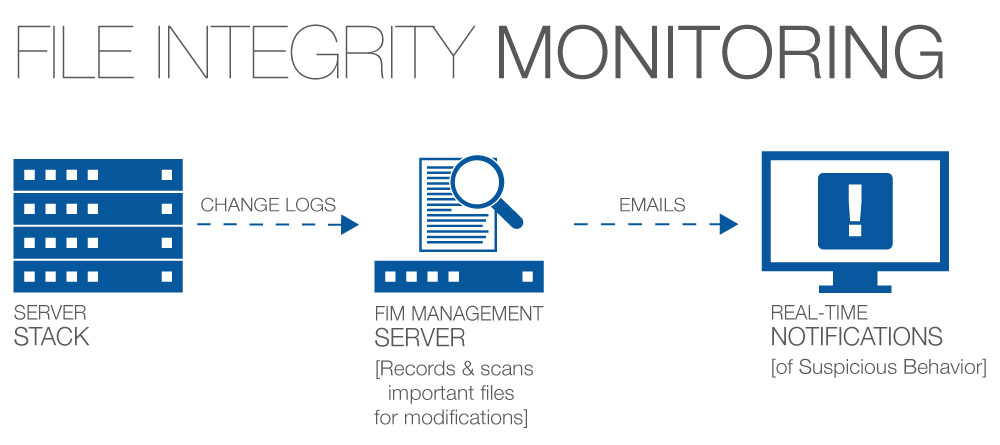
How Does File Integrity Monitoring Work?
File integrity monitoring generally follows six steps:
- Identify critical files and configurations.
- Establish a trusted baseline.
- Generate cryptographic hashes and record important metadata.
- Continuously or periodically monitor for changes.
- Compare changes against the approved baseline and policies.
- Alert, investigate, report, and update the baseline after authorized changes.
This creates a repeatable process for identifying unexpected changes.
CyberDefenders’ current FIM guide similarly organizes the process around defining policy, establishing a baseline, hashing, verifying, alerting, and reporting.
Step 1: Identify Critical Files
Monitoring every file on every system can create unnecessary noise.
Instead, organizations should prioritize files and configurations whose unauthorized modification could affect:
- Security
- Authentication
- Applications
- System availability
- Sensitive data
- Compliance
Step 2: Create a Known-Good Baseline
FIM records the trusted state of selected files.
A baseline may contain:
- Cryptographic hash
- File size
- Permissions
- Ownership
- Creation time
- Modification time
- File location
This baseline represents the approved state against which future changes are compared.
Step 3: Monitor for Changes
The FIM solution continuously or periodically checks monitored assets.
Depending on the technology, monitoring may be:
Real-time: changes are detected as they occur.
Scheduled: files are checked at configured intervals.
Step 4: Compare Against the Baseline
When something changes, FIM compares the new state against the trusted baseline.
For example:
Original hash → 8f21…
Current hash → 94ab…
If the values differ, the contents of the file have changed.
Step 5: Generate an Alert
A useful FIM alert should provide enough context to investigate the event.
It may identify:
- What changed
- When it changed
- Which system was affected
- Which user or process initiated it
- Previous state
- Current state
Step 6: Investigate the Change
Security teams determine whether the modification was:
- Authorized
- Expected
- Accidental
- Suspicious
- Malicious
Approved patches and deployments should ultimately become part of the updated trusted baseline.
File Integrity Monitoring: Features and Benefits
- Create Focus – Xcitium Advanced Endpoint Protection provides the unique capability that helps IT Security teams focus on changes that matter. Save time and resources with a solution that is intuitive and responsive.
- Real–Time Intelligence – Get real–time detection of change‚ anomalies and threat indicators that enable you to address trouble spots quickly. Xcitium AEP delivers the intelligence you need quickly‚ so you can limit damage.
- Deeper Insights – Xcitium’s agent–based deployment provides deeper insight into system security configuration and change. This information reduces the guesswork from what happened‚ when and by whom. Obtain results you can depend on.
- Integration – We deliver a complete system including change ticketing integration. Save time by automating the compromise of detected changes and validate that the planned changes have really occurred.
What Does File Integrity Monitoring Detect?
File integrity monitoring can detect file creation, modification, deletion, permission changes, ownership changes, configuration changes, and other unexpected alterations to monitored assets.
| Change | Example |
|---|---|
| File modification | System binary is altered |
| File creation | Attacker adds a web shell |
| File deletion | Important log file disappears |
| Permission change | Sensitive file becomes publicly readable |
| Ownership change | Critical file gets a new owner |
| Configuration change | Security configuration is modified |
| Registry change | Windows persistence-related key changes |
| Script change | Startup script is modified |
Rapid7 specifically notes that FIM can detect content edits, new files, deletions, permission changes, and file-attribute changes.
What Files Should File Integrity Monitoring Monitor?
FIM should focus on security-sensitive and business-critical assets, not every temporary file generated by the operating system.
Priority targets can include:
Operating System Files
Monitor critical:
- System binaries
- Libraries
- Startup files
- Authentication files
- System configurations
Application Files
Monitor:
- Executables
- Application binaries
- Configuration files
- Web application directories
- Scripts
Security Configurations
Monitor files controlling:
- Authentication
- Authorization
- Firewall rules
- Security tools
- Logging
- Access permissions
Windows Registry
Selected registry keys can reveal unauthorized configuration or persistence changes.
Web Server Directories
Public-facing web directories deserve particular attention because attackers may place:
- Web shells
- Malicious scripts
- Backdoors
- Modified application files
Important Logs
Unexpected modification or deletion of security logs can indicate an attempt to hide malicious activity.
Current FIM guidance recommends focusing on high-impact OS/security configurations, authentication and permission settings, application directories, scripts, and scheduled-task-related files.
What Should You NOT Monitor With FIM?
This is an important content gap.
Monitoring too much can make FIM ineffective.
Avoid indiscriminately monitoring highly dynamic files such as:
- Temporary files
- Cache directories
- Frequently changing application data
- Routine session files
- Non-security-sensitive generated files
Otherwise, legitimate changes may create thousands of alerts.
The objective is not:
Monitor everything.
It is:
Monitor changes that matter.
What Is a File Integrity Baseline?
A file integrity baseline is a trusted record of the approved state of monitored files and configurations.
The baseline provides the reference FIM needs to determine whether something has changed.
For example:
| Baseline Attribute | Stored Value |
|---|---|
| File | system.conf |
| Hash | Approved cryptographic fingerprint |
| Owner | Administrator |
| Permissions | Authorized users only |
| Size | 18 KB |
| Status | Approved |
If one of these attributes changes unexpectedly, FIM can flag the difference.
The quality of the baseline is critical. Creating a baseline from an already-compromised system could cause malicious files to be treated as trusted.
Why Does FIM Use Cryptographic Hashing?
A cryptographic hash creates a digital fingerprint of a file.
Even a small change to the contents produces a different hash value.
For example:
Trusted File → Hash A
An attacker changes one line:
Modified File → Hash B
Because:
Hash A ≠ Hash B
FIM knows that the file changed.
Current FIM guides commonly identify cryptographic hashing as one of the foundational mechanisms used for baseline comparison.
Why Is File Integrity Monitoring Important?
Organizations experience legitimate system changes every day.
But unauthorized changes can indicate:
- Malware
- Ransomware
- Attacker persistence
- Insider threats
- Configuration errors
- Privilege abuse
- Web-shell installation
- Unauthorized software
- Security-control tampering
File integrity monitoring provides visibility into those changes.
It answers three critical questions:
What changed?
When did it change?
Was the change authorized?
More advanced implementations may also help identify who or what process made the change.
File Integrity Monitoring and Malware Detection
Malware frequently changes systems.
An attacker may:
- Replace a legitimate executable.
- Modify startup scripts.
- Create malicious files.
- Change configuration files.
- Add persistence mechanisms.
FIM can identify those modifications even when the individual change does not initially trigger another security control.
However, FIM is not a replacement for antivirus, EDR, or XDR.
It provides another layer of detection focused specifically on system integrity.
File Integrity Monitoring and Ransomware
Ransomware commonly makes large numbers of file changes.
Potential indicators include:
- Rapid file modifications
- File extensions changing
- Original files disappearing
- Ransom-note files appearing
- Security configurations being altered
FIM may help expose suspicious file activity associated with ransomware.
However, FIM alone should not be positioned as complete ransomware protection.
Effective ransomware defense also requires controls such as:
- Endpoint protection
- EDR/XDR
- Behavioral detection
- Access controls
- Network security
- Backups
- Incident response
Rapid7 likewise positions FIM as complementary to endpoint security rather than a replacement for it.
File Integrity Monitoring and Insider Threats
Not every unauthorized change originates from external attackers.
An employee, contractor, administrator, or compromised privileged account may alter:
- Security settings
- Application configurations
- Access permissions
- Scripts
- Sensitive files
FIM creates visibility into these modifications.
Combined with identity and log information, security teams can determine whether the change matches authorized business activity.
File Integrity Monitoring vs. EDR
This is a strong PAA/comparison opportunity.
| File Integrity Monitoring | EDR |
|---|---|
| Focuses on file/configuration integrity | Focuses on endpoint threats and behavior |
| Detects state changes | Detects suspicious endpoint activity |
| Uses trusted baselines | Uses telemetry and behavioral detection |
| Tracks files/configurations | Tracks processes, endpoints and attacks |
| Useful for compliance | Useful for threat detection and response |
| Provides change evidence | Supports investigation and containment |
FIM and EDR complement each other.
For example:
FIM detects that a critical configuration changed.
EDR may reveal which process made the change and what that process did before and after it.
Frequently Asked Questions About File Integrity Monitoring
What is file integrity monitoring?
File integrity monitoring is a cybersecurity process that detects unauthorized or unexpected changes to critical files, directories, and configurations by comparing their current state against a trusted baseline.
How does file integrity monitoring work?
FIM establishes a trusted baseline of important files, records attributes such as cryptographic hashes and permissions, monitors those assets for changes, compares new states against the baseline, and alerts security teams when unexpected modifications occur.
What does FIM monitor?
FIM can monitor system files, application binaries, directories, scripts, configuration files, registry keys, permissions, ownership, and other security-sensitive system attributes.
What changes can FIM detect?
FIM can detect file creation, modification, deletion, permission changes, ownership changes, configuration changes, and other monitored attribute changes.
Why is file integrity monitoring important?
FIM helps organizations identify unauthorized system changes that may indicate malware, ransomware, attacker persistence, insider activity, configuration errors, or security-control tampering.
Is file integrity monitoring required for PCI DSS?
File integrity/change-detection controls are relevant to PCI DSS environments, but organizations should verify their implementation against the current PCI DSS version and applicable requirements rather than relying on older requirement numbering. The existing Xcitium page currently references PCI DSS 10.5.5 and 11.5, which should be updated during the content refresh.
Is FIM the same as EDR?
No. FIM primarily monitors critical files and configurations for changes, while EDR provides broader endpoint telemetry, threat detection, investigation, and response. The technologies complement each other.
Is FIM the same as SIEM?
No. FIM detects integrity changes to monitored assets, while SIEM collects and correlates security events from multiple sources. FIM alerts can be sent to SIEM for broader investigation.
Can FIM detect ransomware?
FIM can identify suspicious file modifications associated with ransomware, but it should be combined with endpoint protection, behavioral detection, EDR/XDR, backups, and other ransomware defenses.
How do you reduce FIM alert noise?
Focus monitoring on high-value assets, establish accurate baselines, account for approved maintenance, integrate with change management, allowlist trusted activity carefully, and prioritize alerts according to risk.

 Loading...