Endpoint Threat Prevention
Updated on October 21, 2022, by Xcitium
How Endpoint Threat Prevention Works
Endpoint threat prevention uses multiple security layers to stop attacks throughout the attack lifecycle.
- Continuously monitors endpoint activity.
- Scans files and applications before execution.
- Detects suspicious behavior using AI and behavioral analytics.
- Blocks malicious processes in real time.
- Prevents unauthorized applications from running.
- Isolates infected devices from the network.
- Alerts security teams for investigation and response.
Compare Postures:
Default Allow versus Default Deny
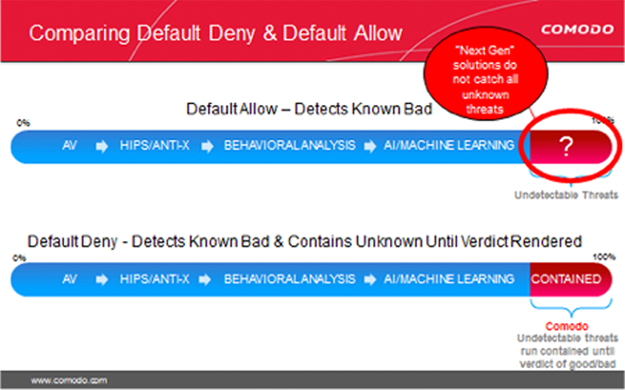
Only Xcitium can deliver maximum security and usability with a Default Deny posture that prevents infection and the resulting damage with Secure Auto Containment combined with extensive detection and response capabilities.

Secure Auto Containment with CPU Enforced OS Virtualization
Xcitium Secure Auto Containment™ provides full endpoint protection by creating a secure container (sandbox) where all unknown files or applications can be used and analyzed. While the unknown file is in the container, in CPU enforced OS virtualization, users can run the file or application safely until Valkyrie, Xcitium’s cloud-based analysis system delivers a trust verdict of good or bad. Good files are allowed to run on the endpoint and bad files are eliminated.
Threat intelligence (first signature) is shared immediately across the enterprise to prevent infection at other threat vectors. As well, signature lists—application whitelisting and malware blacklisting—are dynamically updated as trust verdicts convert unknown files to known.
Xcitium OS virtualization technology is extremely lightweight, has no CPU dependencies and is completely application agnostic. Malware or any other unknown process entering this virtualized environment cannot modify the hard disk, registry, or COM interface; therefore, containing any unknown risk.
- Prevents infection across the network from Web, email, documents, USBs and any executable files
- Defeats known and unknown malware ranging from viruses to trojans, from zero-day malware to advanced persistent threats on patched or unpatched machines
- 100% compatible with old or new CPUs, whether the user is on or off the corporate network.
Along with Secure Auto Containment and Self Protection, the Host Prevention Intrusion System (HIPS) is another layer of defense that makes up Xcitium Advanced Endpoint Protection.
Xcitium Advanced Endpoint Protection provides several levels of Host Intrusion Prevention, incorporating signature, baseline and stateful inspection to prevent malware from executing in the enterprise environment. The HIPS layer looks for deviations from normal or baseline states in bandwidth, protocol usage and ports. Stateful inspection provides visibility of the actual protocols contained in the data packets traversing the network and endpoint.
If HIPS detects an abnormal state, it alerts the user or administrator and follows a predetermined set of actions to prevent the endpoint from being compromised.
- Protects against root-kits, inter-process memory injections, key-loggers and more
- Monitors the activities of all applications and processes on your computer and allows executables and processes to run if they comply with the prevailing security rules
- Blocks the activities of malicious programs by halting any action that could cause damage to operating system, system-memory, registry keys or personal data
Advanced HIPS Monitoring Settings
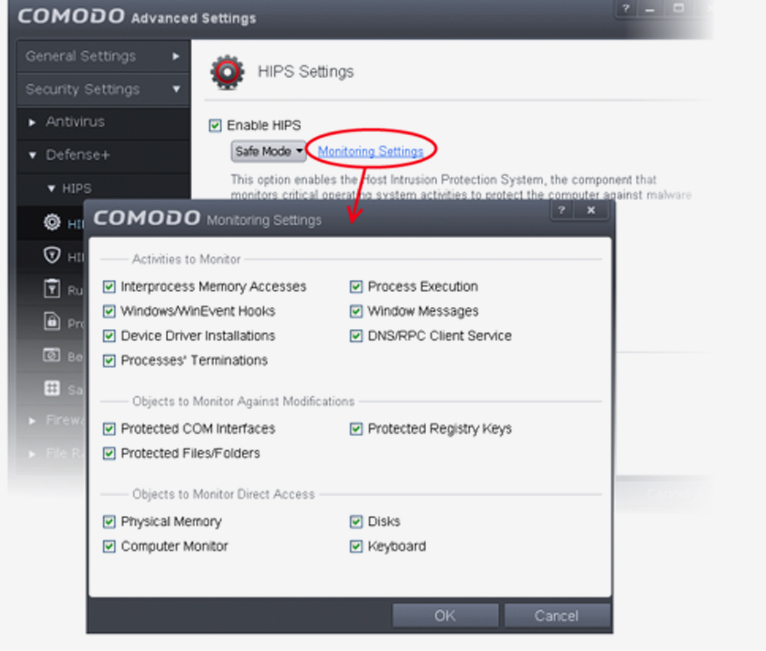
In addition, Xcitium too does behavioral assessment with our host interruption prevention system (HIPS) in conjunction with behavioral analysis / AI / machine learning feature sets at the endpoint and within the cloud. This is needed to identify Advanced Persistent threats (APTs) that will contain routines that attempt to determine in the event that they are in virtualization (a sandbox) or check for fingerprints of specific security vendors’ sandbox situations. In the event that the Apt code detects a sandbox, it won’t run its malicious execution way and can persist.
- Authenticates the integrity of every program before allowing it to load into your computer’s memory
- Performs Cloud Based Behavior Analysis for immediate identification of Malware
- Alerts you every time an unknown or untrusted applications attempts to run or install
- Blocks Viruses, Trojans and Spy-ware before they can ever get onto your system
- Prevents unauthorized modification of critical operating system files and registry entries
- Includes auto-sandbox feature to completely isolate untrusted files from the rest of your computer
Improving Your Posture
Default Deny Security with Default Allow Usability
Since the default allow posture is the underlying problem, we need to flip an organization’s overall security posture to Default Deny to eliminate malware threats.
Xcitium’s breakthrough security allows the known good, blocks the known bad and contains the unknown until a verdict can be determined.
Productivity is assured, and no malware runs on your endpoints.
Your endpoints are 100% malware-free with a viable Default Deny Security Posture. You can manage and protect any device, whether it’s on or off your company network with Xcitium™ Advanced Endpoint Protection.
Endpoint Threat Prevention vs Endpoint Detection and Response (EDR)
| Feature | Endpoint Threat Prevention | Endpoint Detection and Response (EDR) |
|---|---|---|
| Primary Goal | Prevent attacks before execution | Detect and investigate attacks |
| Malware Protection | Yes | Yes |
| Behavioral Analysis | Yes | Yes |
| Threat Hunting | Limited | Advanced |
| Automated Response | Yes | Yes |
| Incident Investigation | Basic | Advanced |
| Best Use | Preventing attacks | Investigating and responding |
Types of Threats Prevented
Threats Blocked by Endpoint Threat Prevention
| Threat | Prevention Method |
|---|---|
| Ransomware | Behavioral detection and rollback |
| Malware | Signature and AI detection |
| Zero-Day Exploits | Behavior monitoring |
| Fileless Malware | Memory analysis |
| Phishing Payloads | URL and attachment protection |
| Trojans | Execution prevention |
| Spyware | Process monitoring |
| Rootkits | Kernel protection |
| Credential Theft | Memory protection |
| Malicious Scripts | Script control and sandboxing |
Key Technologies Used in Endpoint Threat Prevention
Modern endpoint threat prevention platforms combine multiple security capabilities.
- Artificial Intelligence (AI)
- Machine Learning (ML)
- Behavioral Analysis
- Exploit Prevention
- Application Control
- Sandbox Analysis
- Threat Intelligence
- Memory Protection
- Device Control
- Cloud-Based Threat Detection
Benefits of Endpoint Threat Prevention
Organizations rely on endpoint threat prevention because it helps:
- Stop attacks before execution
- Reduce ransomware risk
- Protect remote and hybrid workers
- Prevent data breaches
- Improve regulatory compliance
- Reduce incident response costs
- Minimize business downtime
- Strengthen overall cyber resilience
Endpoint Threat Prevention Best Practices
Best Practices Checklist
- Deploy endpoint protection on every device.
- Enable real-time threat monitoring.
- Keep operating systems and applications patched.
- Use application allowlisting where appropriate.
- Enforce multi-factor authentication (MFA).
- Restrict administrative privileges.
- Scan downloads before execution.
- Monitor endpoint behavior continuously.
- Isolate compromised devices immediately.
- Train users to recognize phishing attempts.
- Integrate endpoint telemetry with SIEM or XDR platforms.
- Review security policies regularly.
Endpoint Threat Prevention vs Traditional Antivirus
| Traditional Antivirus | Endpoint Threat Prevention |
|---|---|
| Signature-based detection | AI and behavioral analysis |
| Focuses on known malware | Detects known and unknown threats |
| Limited visibility | Continuous endpoint monitoring |
| Reactive protection | Proactive prevention |
| Basic malware removal | Multi-layered attack prevention |
Signs Your Organization Needs Endpoint Threat Prevention
Consider implementing endpoint threat prevention if you experience:
- Increasing phishing attempts
- Frequent malware infections
- Remote or hybrid workforce growth
- Unmanaged endpoint devices
- Ransomware concerns
- Slow incident response
- Compliance requirements
- Limited endpoint visibility
Common Endpoint Threat Prevention Features
| Feature | Purpose |
|---|---|
| Real-Time Protection | Stops threats immediately |
| Behavioral Analytics | Detects suspicious activity |
| AI-Based Detection | Identifies unknown threats |
| Exploit Prevention | Blocks software exploits |
| Device Control | Restricts unauthorized devices |
| Application Control | Prevents unauthorized software execution |
| Threat Intelligence | Identifies emerging threats |
| Automated Response | Contains attacks quickly |
| Centralized Management | Simplifies administration |
Endpoint Self Protection from
Disabling Malware
Your enterprise security solution will be rendered useless if it can’t protect itself against critical process termination. Malware authors know this and will try to disable security to enter your environment.
Viruses and Trojans (ransomware) often try to disable your computer’s security applications so that they can operate without detection. Xcitium Advanced Endpoint Protection secures its own registry entries, system files and processes so malware can never shut it down or sabotage the installation.
Xcitium Advanced Endpoint Protection has the strongest “Self-Protection” of any security software, providing continuous protection of itself as well as the subsystem it relies on, as well as constant monitoring and protection of the operating system and all trusted applications.
People Also Ask (FAQ)
What is endpoint threat prevention?
Endpoint threat prevention is a cybersecurity solution that proactively blocks malware, ransomware, phishing attacks, fileless malware, and zero-day threats before they can compromise endpoint devices.
Why is endpoint threat prevention important?
It reduces the risk of cyberattacks, protects sensitive data, minimizes downtime, supports compliance, and helps organizations defend remote and on-premises endpoints against evolving threats.
What threats does endpoint threat prevention stop?
Endpoint threat prevention helps stop:
- Ransomware
- Malware
- Trojans
- Spyware
- Fileless attacks
- Zero-day exploits
- Credential theft
- Malicious scripts
- Phishing-delivered malware
What is the difference between endpoint protection and endpoint threat prevention?
Endpoint protection is a broad category that includes antivirus, firewalls, device control, and endpoint management. Endpoint threat prevention specifically focuses on proactively preventing cyber threats before they execute or spread.
How does AI improve endpoint threat prevention?
AI analyzes endpoint behavior, identifies anomalies, detects previously unknown threats, automates prevention decisions, and enables faster response to emerging attacks.
Can endpoint threat prevention stop ransomware?
Yes. Modern endpoint threat prevention solutions detect ransomware behavior, block encryption attempts, isolate compromised devices, and may support rollback or recovery features to reduce the impact of an attack.

